| FASHION DESIGNING USING PHOTOSHOP |
| |
| Phase I |
| 1) |
How to Start the Photoshop program |
| 2) |
Introduction to the Photoshop program |
| 3) |
Introduction to Open File |
| 4) |
Introduction to Close File |
| 5) |
Introduction to Save File |
| |
|
| 4) |
Toolbox |
| a) |
Selection Tools |
| b) |
Elliptical Tool |
| c) |
Move Tool |
| d) |
Lasso Tool |
| e) |
Polygon Tool |
| f) |
Magnetic Lasso Tool |
| g) |
Magic Wand Tool |
| h) |
Crop Tool |
| i) |
Brush Tool |
| j) |
Clone Stamp |
| k) |
Eraser Too |
| l) |
Gradient Tool |
| m) |
Zoom Tool |
| n) |
Pen Tool |
| 0) |
Default Color |
| p) |
Swatches Tool |
| |
|
| |
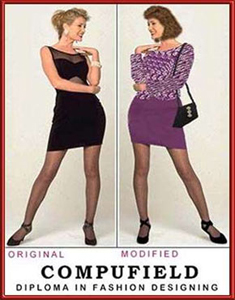
Exercise 1 |
| |
Exercise |
|
Original |
Modified |
|
| |
| Phase II |
| 5) |
Edit Menu |
| a) |
Cut |
| b) |
Copy |
| c) |
Paste |
| d) |
Free Transform |
| e) |
Transform |
| |
|
| 6) |
Layer Palette |
| a) |
Making Layer Active |
| b) |
Move the Layer |
| c) |
Load The Selection Of Layer |
| |
|
| 7) |
Edit Menu |
| a) |
Fill |
| b) |
Stroke |
| |
|
| |
Exercise 2 |
| |
Exercise |
|
Original |
Modified |
|
| |
|
| Phase III |
| 8) |
Layer Menu |
| a) |
Duplicate Layer |
| b) |
Delete Layer |
| c) |
Layer Properties |
| d) |
Layer Opacity |
| |
|
| 9) |
Image Menu |
| |
Mode |
| |
Adjustment |
| |
| a) |
Level |
| b) |
Color Balance |
| c) |
Brightness/Contrast |
| d) |
Hue/Saturation |
| e) |
Desaturate |
|
| |
|
| 10) |
Toolbox |
| |
| a) |
Pen Tool |
| b) |
Path Selection |
| c) |
Text Tool |
| d) |
Text Properties |
|
| |
|
| 11) |
Select Menu |
| |
| a) |
All |
| b) |
Deselect |
| c) |
Reselect |
| d) |
Inverse |
| e) |
All Layer |
| f) |
Deselect Layer |
| g) |
Similar Layer |
| h) |
Feather |
| i) |
Modify |
| j) |
Transform Selection |
| k) |
Load Selection |
| l) |
Save Selection |
|
| |
|
| |
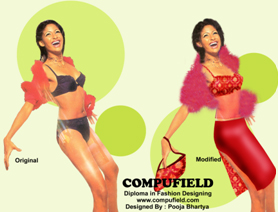
Exercise 3 |
 |